
filed in
Business Bank Account Bonuses: What to Look For, and How to Connect It in QuickBooks

Banks compete for business accounts with cash bonuses, fee waivers, and free business tools — often worth hundreds of dollars if you meet a minimum deposit and activity requirement.
Here’s what’s typically on offer, what to check before you switch, and the exact steps to add the account and connect its bank feed in QuickBooks Online once you’ve opened it.
What incentives do banks offer for new business accounts?
New business bank accounts commonly come with a cash bonus, waived fees, or access to business tools, and most require you to meet a minimum deposit or maintain a balance for a set period to qualify.
| What are business bank account incentives? Business bank account incentives are the cash bonuses, fee waivers, and tools banks offer to win new business customers, usually tied to a minimum opening deposit or a set number of transactions within the first 60-90 days. |
- Cash bonuses — often a few hundred dollars for meeting a minimum deposit and, in many cases, maintaining that balance or hitting an activity requirement for 60-90 days.
- Fee waivers — reduced or waived monthly maintenance fees, wire transfer fees, or overdraft fees, sometimes permanently and sometimes for an introductory period only.
- Business tools and support — free access to invoicing tools, cash flow dashboards, or a dedicated business banker consultation.
How do you compare business bank account offers?
The bonus that grabs your attention isn’t always the best deal once the account’s ongoing fees and requirements are factored in.
| Incentive | What to verify before you switch |
|---|---|
| Cash bonus | The exact deposit amount and holding period required, and whether the bonus is reversed if you close the account early |
| Fee waivers | Whether waived fees are permanent or only for an introductory period, and what the standard fee becomes after |
| Business tools | Whether the tools actually integrate with QuickBooks Online, or just duplicate what you’re already using |
A bonus tied to a $5,000 minimum deposit only makes sense if that cash isn’t better used elsewhere in the business over the same 60-90 days.
How do you add a business bank account to QuickBooks Online?
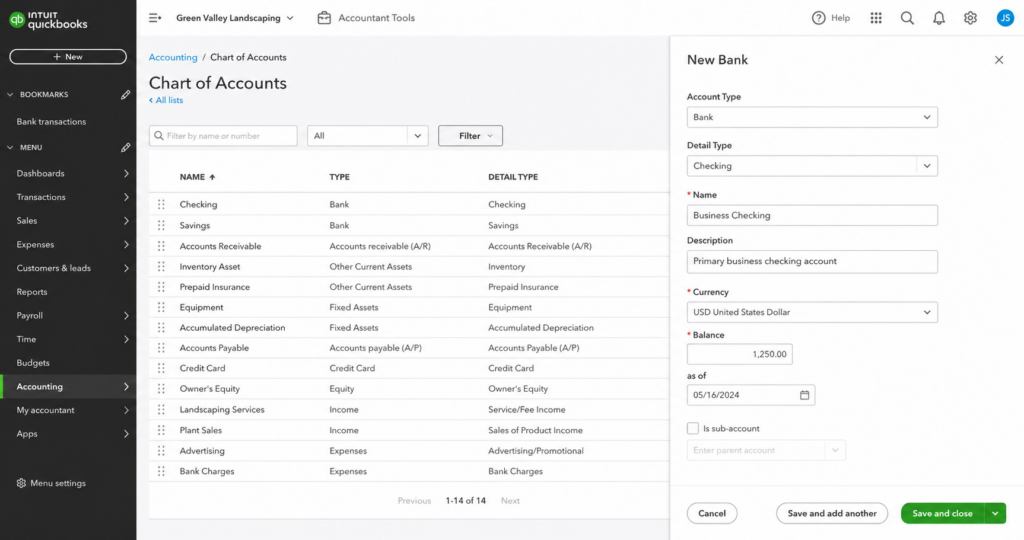
Step 1: Add the account to your Chart of Accounts
- Go to Settings > Chart of Accounts.
- Click New, then select Bank as the Account Type.
- Choose the Detail Type that matches your account, such as Checking or Savings.
- Enter the account name, for example, Business Checking Account.
- Optionally add a description and an opening balance, using the balance from your most recent bank statement.
- Click Save and Close.
How do you connect the bank feed in QuickBooks Online?
Connecting the bank feed lets QuickBooks import transactions automatically instead of you entering them by hand.
- Go to Banking (or Transactions > Banking) from the left menu, then click Link Account in the top right.
- Search for your bank by name or website URL, then log in with your online banking username and password, completing any additional verification your bank requires.
- Select the specific account or accounts you want to connect — checking, savings, or credit card.
- Set the transaction download range. Most banks default to 90 days, though some support up to 24 months, so check what your bank allows.
- Match each connected account to the corresponding account in your Chart of Accounts.
- Click Connect. QuickBooks will begin importing transactions.
What should you do after connecting the bank feed?
Once the feed is live, a few habits keep it useful instead of becoming another thing to clean up later.
- Set up bank rules to automatically categorize recurring transactions, so vendors and regular expenses don’t need manual review every time.
- Reconcile monthly, not just at year-end, so a bank error or duplicate charge gets caught while it’s still easy to trace.
- Disconnect a feed carefully if needed — go to Banking, select the account, and use the pencil icon to edit or disconnect it, rather than deleting the account outright.
| Next step: Not sure which business bank account actually fits your cash flow? Book a consultation with Blaize Accounting Services, and we’ll help you compare the real cost, not just the bonus. |
Frequently asked questions
Is a business bank account sign-up bonus taxable?
Yes. Unlike credit card rewards, cash bonuses for opening a bank account are treated by the IRS as taxable interest income, and your bank will typically report it on Form 1099-INT if it totals more than $10 for the year.
How long does it take to connect a bank feed in QuickBooks Online?
Usually just a few minutes to log in and select your accounts, though the initial transaction import can take longer depending on how far back your bank allows you to pull history.
Why isn’t my bank feed importing all my transactions?
Most banks only let QuickBooks pull 90 days of history by default, so anything older than that won’t appear automatically. Check your bank’s specific download range, which can go up to 24 months for some institutions.
Should I choose a business bank account based on the bonus?
Not by itself. Weigh the bonus against ongoing monthly fees, minimum balance requirements, and whether the account’s tools actually work with the bookkeeping software you already use.
What happens if I close my account before the bonus period ends?
Many banks reverse or claw back the bonus if you close the account or drop below the required balance before the holding period is up, so confirm the exact terms before you count on the bonus.
| Work with Blaize Accounting Services: Once your business bank account is open, the next step is connecting it to your accounting software so transactions flow in automatically. Our QuickBooks and Xero setup service handles the connection, categorization rules, and initial training so you start clean.” Blaize Accounting Services helps small businesses across Bergen, Passaic, Essex, Morris, and Hudson counties choose the right business bank account and get it connected correctly in QuickBooks. Schedule a consultation to get set up right the first time. |
ABOUT THE AUTHOR
Tania Blaize is the founder of Blaize Accounting Services, based in Bergen County, NJ, with more than 20 years of experience in bookkeeping, accounting, and tax planning. She works with small businesses and high-net-worth individuals across Northern NJ, including Passaic, Essex, Morris, and Hudson counties.
This article is general information, not tax or legal advice for your specific situation. Consult a qualified professional about how bank incentives and account setup apply to your own business.
