
The right accounting software fits how your business actually operates today, has room to scale as you grow, and doesn’t lock you into hidden fees or a system your team refuses to use.
Whether you’re moving off spreadsheets or replacing a system you’ve outgrown, here’s the decision framework we walk clients through, covering the factors that actually matter and the ones that get overlooked until they cause a problem.
What should you evaluate before choosing accounting software?
Start with your business’s actual transaction volume and complexity, not a generic feature list — a solo consultant and a 15-employee contractor need very different systems.
| What makes accounting software the ‘right fit’?The right accounting software matches your current transaction volume and complexity, integrates with the other tools you already use, and can scale to more users, transactions, and features without requiring a full switch to a new platform. |
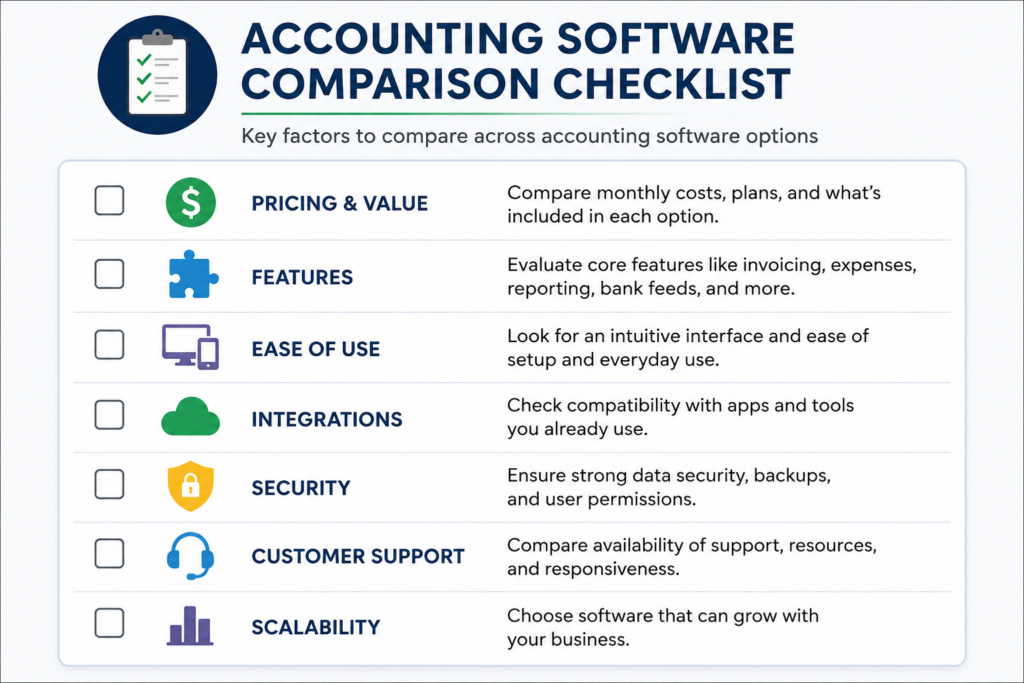
- Transaction complexity — do you have inventory to track, recurring billing, multiple locations, or project-based job costing?
- Team size today and in a year — a system priced per user gets expensive fast if you’re about to add staff.
- Room to scale — can the platform add users, transaction volume, and features without forcing a migration to a different product later?
How much do ease of use and integrations actually matter?
A powerful system your team avoids using is worse than a simpler one they actually open every day.
- Ease of use — can a new hire learn the basics in a day, or does every transaction require a workaround?
- Integrations — does it connect directly to your CRM, payment processor, payroll provider, and e-commerce platform, or will you be re-entering the same data twice?
- Bank feed reliability — some platforms sync more reliably with certain banks than others, so check this specifically for your bank before committing.
What security features should accounting software have?
Your accounting software holds bank connections, customer payment data, and your full financial history, so security isn’t optional.
- Data encryption in transit and at rest, not just a password on the login screen.
- Multi-factor authentication, and ideally the ability to require it for every user on the account.
- Automatic backups and a clear process for restoring data if something goes wrong.
- Independent security certification, such as a SOC 2 Type II report, which most established platforms will provide on request.
What does accounting software actually cost?
The monthly subscription price is rarely the full cost. Compare these categories before you commit to a plan.
| Cost category | What to check |
|---|---|
| Base subscription | Which tier you actually need, not the cheapest one that looks similar on paper |
| Per-user or per-seat fees | Whether adding staff or your accountant increases the monthly cost |
| Add-ons | Payroll, inventory, or advanced reporting are often priced separately from the base plan |
| Setup and migration | One-time costs to move historical data from your current system |
| Price-increase history | How often the vendor has raised prices — several major platforms have raised rates more than once in the past year |
That last line matters more than it looks. Several major accounting platforms have raised subscription prices multiple times in the past year, so ask about a vendor’s pricing history, not just today’s rate, before you build a long-term plan around one system.
What support, customization, and mobile access should you expect?
These three factors don’t show up in a demo, but they’re what you’ll actually notice six months in.
- Support and training — what channels are available (phone, chat, email), and what’s the typical response time when something breaks?
- Customization — can you build the specific reports you need and automate the workflows that are unique to your business, or are you stuck with generic templates?
- Mobile access — can you approve an expense, check a report, or send an invoice from your phone, or does everything require a desktop?
How should you use reviews to compare accounting software?
Reviews are most useful when they come from businesses similar to yours, not a generic star rating.
- Filter by business size and industry on review sites like G2 or Capterra rather than reading the overall average.
- Ask peers in your industry what they use and what they’d switch to if they could — this catches problems a polished demo won’t show.
- Watch for recurring complaints, especially around support response time or unexpected price increases, since one bad review is noise but ten similar ones are a pattern.
| Next step: Not sure which accounting software actually fits your business? Book a consultation with Blaize Accounting Services, and we’ll help you compare the real options. |
Frequently asked questions
What’s the most important factor when choosing accounting software?
Fit for your actual transaction volume and complexity today, plus room to scale — a system that’s perfect for a five-person business can become a liability at twenty employees if it can’t grow with you.
Is QuickBooks Online the best accounting software for small businesses?
It’s the most widely used and integrates with the broadest range of other business tools, which makes it a strong default for many small businesses, but the right choice still depends on your specific needs, industry, and budget.
How much should small business accounting software cost?
Costs vary widely by plan tier, user count, and add-ons like payroll or inventory. Compare the full cost, including setup fees and per-user pricing, not just the advertised base subscription price.
How often do accounting software companies raise prices?
More often than most business owners expect. Several major platforms have raised subscription prices more than once within the past year, so ask a vendor about their pricing history before committing long-term.
What security certifications should I look for in accounting software?
A SOC 2 Type II report is a strong signal; it means an independent auditor has verified the vendor’s security controls over time, not just at a single point in time.
| Work with Blaize Accounting Services: Blaize Accounting Services helps small businesses across Bergen, Passaic, Essex, Morris, and Hudson counties choose, set up, and get the most out of their accounting software. Schedule a consultation to find the right fit for your business. |
ABOUT THE AUTHOR
Tania Blaize is the founder of Blaize Accounting Services, based in Bergen County, NJ, with more than 20 years of experience in bookkeeping, accounting, and tax planning. She works with small businesses and high-net-worth individuals across Northern NJ, including Passaic, Essex, Morris, and Hudson counties.
This article is general information, not a recommendation for any specific software product. Evaluate options based on your own business’s needs before making a decision.
