
filed in
Best Bookkeeping Software for Bergen County Small Businesses
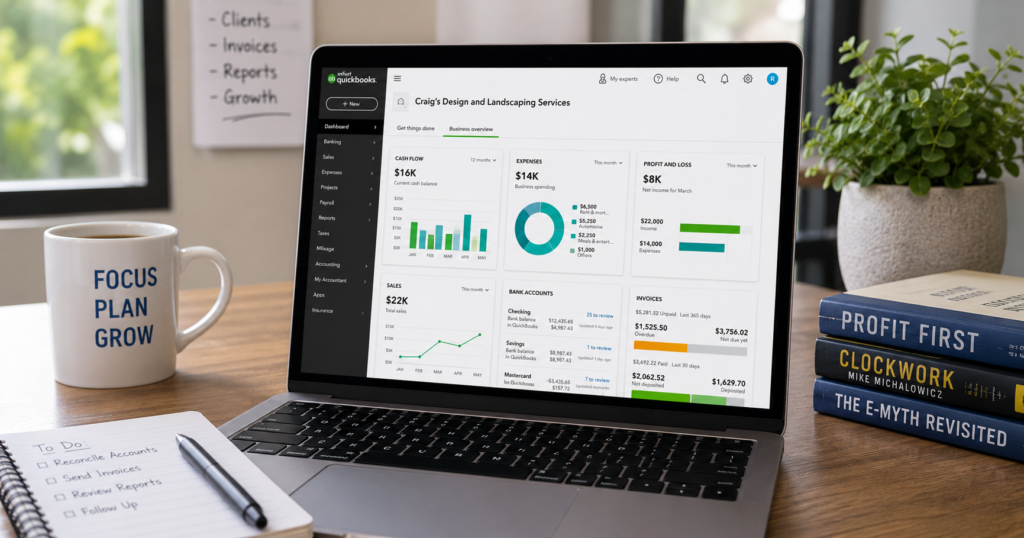
QuickBooks Online and Xero are the two platforms most Bergen County small businesses should evaluate first: QuickBooks Online for its deep accountant network and payroll integration, Xero for unlimited users at a flat monthly price. Wave is worth a look only for very early-stage businesses with minimal transaction volume.
Pricing on all three has shifted in 2026, and the plan that fit your business two years ago may no longer be the best value. Here’s the current lineup and how to match it to your business, including what we’ve actually seen work and not work, when we’ve helped Bergen County clients make this decision or switch platforms mid-stream.
What should bookkeeping software actually do for you?
Good bookkeeping software should connect directly to your bank and credit card feeds, let you or your bookkeeper reconcile accounts monthly, generate a profit and loss statement and balance sheet on demand, and hand off cleanly to your tax preparer at year-end.
It’s easy to get pulled into comparing features that sound impressive but rarely matter for a small business — AI-generated insights, elaborate dashboards, mobile apps with every bell and whistle. The five items below are the ones that actually determine whether your books stay accurate month over month, which is the only real measure of whether the software is working for you.
- Bank feed connections — automatic import from your business accounts.
- Invoicing and accounts receivable — send invoices and track what’s outstanding.
- Reporting — a profit and loss and balance sheet you can pull in seconds.
- Accountant access — the ability for your bookkeeper or CPA to log in directly, not work off exports.
- Payroll integration — native or connected payroll so wages post to the books automatically.
QuickBooks Online vs Xero vs Wave: pricing and features side by side
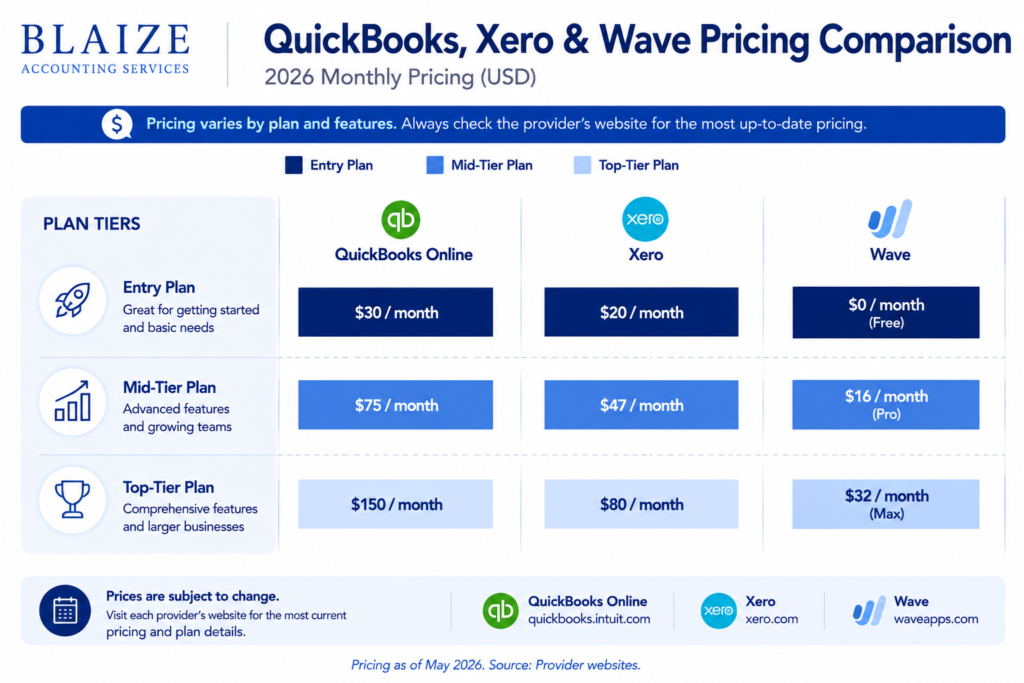
As of mid-2026, QuickBooks Online runs $20 to $275 a month across five tiers, and Xero runs $25 to $90 a month across three tiers — both raised prices earlier this year, so confirm current rates before budgeting.
The headline numbers only tell part of the story, though. QuickBooks Online’s tiers are gated by number of users and feature depth, so a growing team can find itself pushed into a higher tier just to add a second or third person with access. Xero sidesteps that by including unlimited users on every plan, which is the single biggest structural difference between the two platforms and often matters more than the sticker price once you look past the entry tier.
| Platform | Entry price | Mid-tier price | Top tier | Users included |
|---|---|---|---|---|
| QuickBooks Online | $20/mo (Solopreneur) | $75/mo (Essentials) | $275/mo (Advanced) | Limited by tier, up to 25 |
| Xero | $25/mo (Early) | $55/mo (Growing) | $90/mo (Established) | Unlimited on every tier |
| Wave | Free core accounting | N/A | N/A | Unlimited; revenue from payment processing fees |
See QuickBooks Online’s official pricing and Xero’s official pricing for current rates, since both change plans and promotions periodically.
Which platform fits which type of business?
Service businesses with a handful of employees
QuickBooks Online Essentials or Plus fits well here — the accountant network is deep, and most bookkeepers in Bergen County already work in it daily. If you ever need to bring in a CPA for tax planning or a specialist for a one-off question, the odds are high they already know QuickBooks Online, which shortens the learning curve on both sides.
Businesses with 3 to 15 employees who don’t want per-seat pricing
Xero’s unlimited-user model means a five-person team pays the same subscription as a solo owner, which can meaningfully undercut QuickBooks Online Plus once you add multiple users. This matters most for businesses where several people — an office manager, a project lead, an owner — all need to view or enter data regularly, rather than routing everything through one person.
Very early-stage or pre-revenue businesses
Wave’s free core accounting can hold you over until transaction volume justifies a paid platform. Just know you’ll pay processing fees on invoices and lose some of the automation QuickBooks and Xero offer. We generally recommend planning the eventual move to a paid platform early, rather than treating Wave as a permanent home, since migrating later means untangling the books that were set up in year one.
Businesses with inventory or multiple locations
QuickBooks Online Plus or Advanced generally handles inventory and location tracking more natively than Xero’s US edition. If your business tracks stock across more than one location, or needs to see profitability broken out by location, this is usually the deciding factor over Xero’s simpler per-user pricing.
What about FreshBooks or other alternatives?
FreshBooks and similar platforms can work well for solo service providers who mainly need invoicing and light expense tracking, but they generally offer less robust reconciliation, reporting, and accountant-access tools than QuickBooks Online or Xero. For most small businesses beyond the solo stage, we steer clients toward one of the two main platforms specifically because of how much easier they make it to hand off clean books to a bookkeeper or CPA. The exception is a true solo freelancer with simple, low-volume invoicing needs and no plans to bring on staff — for that narrow case, a lighter platform can be perfectly adequate, and switching later is a manageable project rather than a major disruption.
What does it cost to switch software?
| Key takeaway: Switching platforms mid-year is usually more disruptive than picking the slightly more expensive plan up front. Historical data migration, reconnecting bank feeds, and re-training staff all take real time, so choose based on where your business will be in 12 months, not just today. |
One switch worth planning for even if you’re happy with your current setup: Intuit is winding down QuickBooks Desktop. Support for the 2023 version ended in May 2026, and the 2024 release is the final Desktop version Intuit plans to ship, which means every remaining Desktop user will eventually need to move to QuickBooks Online or another cloud platform. If you’re still on Desktop, it’s worth planning that migration on your own timeline rather than waiting until support runs out.
- Export your historical data first — most platforms make this easy, but do it before you need it, not during a crisis.
- Rebuild your chart of accounts intentionally — don’t just copy an old, cluttered structure into the new platform.
- Reconnect bank feeds carefully — duplicate transactions during a migration are common if feeds overlap with manually imported data.
- Run a parallel month — keep the old system live alongside the new one for one full month to confirm the numbers match before fully cutting over.
Switching platforms: what it actually looks like
The comparison tables above make switching sound like a spreadsheet decision. In practice, it’s a project. Here’s a composite example of how one typically goes.
A retail business we worked with had been running on QuickBooks Desktop for close to a decade and was still manually emailing backup files between the owner and their bookkeeper. Between the looming end of Desktop support and the owner wanting real-time visibility from her phone, we moved her to QuickBooks Online. The migration itself took about two weeks: exporting historical data, rebuilding the chart of accounts to match how the business actually operated rather than copying an outdated structure, reconnecting bank feeds, and running a parallel month to confirm the numbers matched before fully cutting over. The real payoff showed up afterward — she could see her cash position from her phone during a buying trip instead of waiting for a weekly email.
The pattern holds across most migrations, regardless of which platform a business is moving to or from: the software swap itself is the easy part. The harder, more valuable part is using the move as a reason to fix a chart of accounts that’s grown messy over the years, rather than dragging old bad habits into a shiny new platform. That’s also the moment we most often catch categorization errors that have been quietly compounding for years, since rebuilding the structure from scratch forces a fresh look at every account.
Industry-specific integrations Bergen County businesses ask about
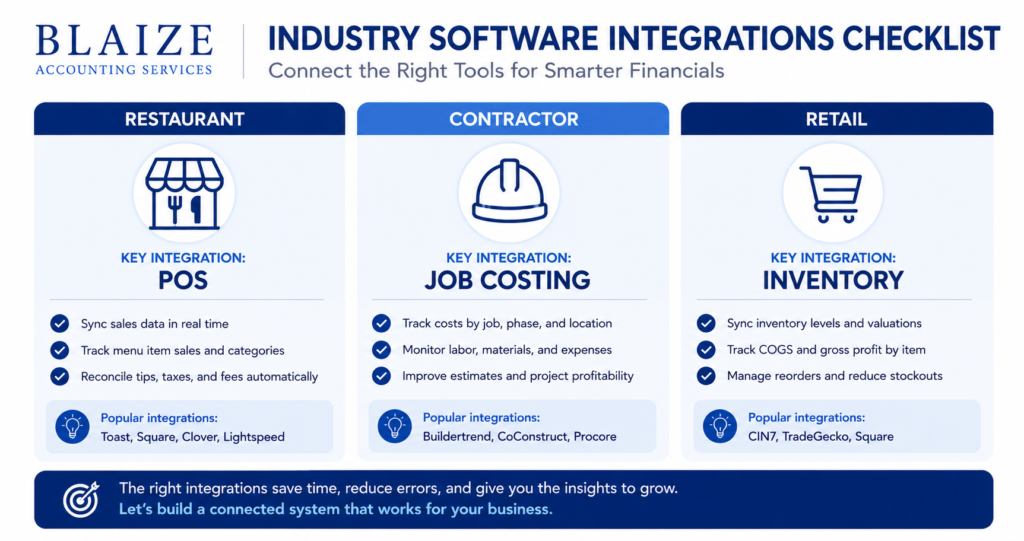
Beyond core bookkeeping, most businesses eventually need their accounting software to talk to at least one other system. What that system is depends heavily on the industry.
Restaurants and food service
Point-of-sale integration is the one that matters most — connecting a system like Toast or Square directly to QuickBooks Online so daily sales, tips, and sales tax post automatically instead of getting keyed in by hand. We’ve set this up for several restaurant clients, and the time savings alone usually justifies the setup work within the first month. It also tends to catch discrepancies faster — a POS integration that stops syncing shows up immediately as a gap in the daily feed, rather than surfacing months later during a reconciliation.
Contractors and trades
Job costing is the feature contractors ask about most — the ability to see profitability by job, not just by month. QuickBooks Online Plus handles this natively; a contractor client of ours used it to discover that one recurring commercial client was consistently less profitable than his residential jobs, once labor and material costs were tracked by project instead of lumped together. That single insight changed how he priced his next commercial bid.
Retail and e-commerce
Inventory tracking and integration with a sales channel — Shopify, Amazon, or a POS system matters most here. QuickBooks Online Plus and Advanced generally offer more native inventory functionality than Xero’s US edition, which is one of the more common reasons we steer retail clients toward QuickBooks over Xero even when a client would otherwise lean toward Xero’s flat per-organization pricing.
| Next step: Not sure which platform fits your business? Book a consultation, and we’ll walk through both. |
Frequently asked questions
Is QuickBooks Online or Xero better for a small business?
QuickBooks Online has the larger accountant network and stronger payroll and inventory features; Xero offers unlimited users at a flat price, which often costs less for teams of three or more.
Is Wave good enough for a real small business?
Wave works for very early-stage or low-volume businesses that mainly need invoicing and basic bookkeeping, but most growing businesses outgrow it within a year or two, especially once payroll or inventory enters the picture.
How much does QuickBooks Online cost in 2026?
QuickBooks Online runs $20 a month for Solopreneur up to $275 a month for Advanced, across five tiers, following price increases earlier in 2026.
How much does Xero cost in 2026?
Xero runs $25 a month for Early, $55 for Growing, and $90 for Established, with unlimited users included on every tier.
Can my bookkeeper help me choose between QuickBooks and Xero?
Yes — a bookkeeper who works in both platforms can map your specific transaction volume, payroll needs, and reporting requirements to the plan that actually fits, rather than the one with the best marketing.
Is QuickBooks Desktop going away?
Yes. Support for QuickBooks Desktop 2023 ended in May 2026, and the 2024 release is the final Desktop version Intuit plans to ship, so remaining Desktop users will eventually need to migrate to a cloud platform.
How long does it take to migrate from one accounting platform to another?
A typical small-business migration takes one to three weeks, including exporting historical data, rebuilding the chart of accounts, reconnecting bank feeds, and running a parallel period to confirm the numbers match before fully cutting over.
| Work with Blaize Accounting Services: Blaize Accounting Services sets up and manages QuickBooks Online and Xero for small businesses across Bergen County. Schedule a call to get set up right the first time. |
ABOUT THE AUTHOR
Tania Blaize is the founder of Blaize Accounting Services, a Bergen County firm providing bookkeeping, QuickBooks and Xero support, and tax planning for small businesses and high-net-worth individuals across Northern New Jersey. She has more than 20 years of experience helping business owners get their books under control.
This article is general information, not tax or accounting advice for your specific situation. Software pricing changes periodically — confirm current rates directly with the provider before purchasing..
