

QuickBooks now uses AI to categorize transactions, flag unusual activity in real time, forecast cash flow, match receipts to bank transactions, and answer plain-English questions about your finances.
For a small business owner in Bergen County or anywhere else in Northern NJ, that means fewer hours lost to data entry and fewer costly mistakes slipping through unnoticed. Here’s what’s actually running under the hood, and what it means for how your books get kept.
How does QuickBooks categorize transactions automatically?
QuickBooks Online learns from the choices you and your bookkeeper make in the Banking feed. Once you confirm that a FedEx charge belongs under Shipping, Intuit Assist applies that same category to future FedEx transactions without anyone touching them again.
| What is Intuit Assist? Intuit Assist is Intuit’s built-in AI assistant inside QuickBooks that automates transaction categorization, drafts invoice reminders, extracts receipt data, and generates cash flow forecasts — so business owners spend less time on manual entry and more time reviewing what the numbers mean. |
You can still set explicit bank rules for vendors you want handled a specific way every time, under Banking > Rules — the AI suggestions build on top of those rules, not around them.
- Fewer manual entries — categories apply automatically once a pattern is confirmed.
- More consistent books — the same vendor lands in the same category every time, which matters at tax time.
- Less time reconciling — clean categorization up front means less cleanup during monthly close.
Can QuickBooks catch bookkeeping errors before they cost you money?
QuickBooks flags unusual transactions in real time inside the Banking feed and Intuit Assist’s Business Feed, instead of waiting for a bank reconciliation to surface the problem weeks later.
- A vendor invoice paid twice in the same week
- A charge from a merchant you’ve never used before
- A bank transaction that doesn’t match anything already recorded in your books
Catching a duplicate payment or an out-of-pattern charge the same week it happens, rather than during a quarterly review, is often the difference between a quick fix and a drawn-out dispute with a vendor or bank.
How accurate is QuickBooks’ AI cash flow forecasting?
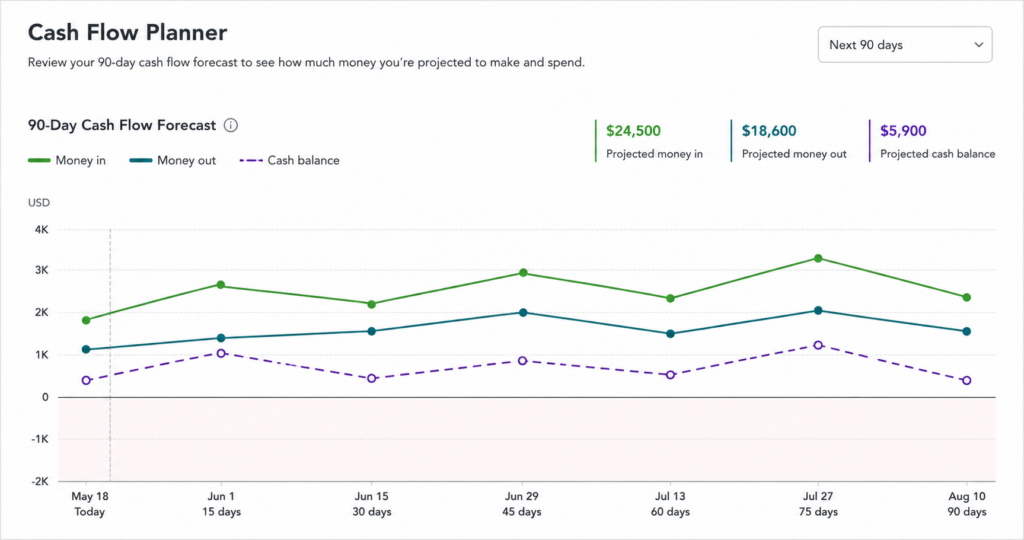
QuickBooks’ Cash Flow Planner builds a 90-day forecast from your actual transaction history, projecting when money is likely to come in and go out based on patterns like recurring bills, typical customer payment timing, and seasonal swings in revenue. Read more about how the Cash Flow Planner works directly from Intuit.
It’s a forecast, not a guarantee. A forecast is only as reliable as the transaction history behind it — a new business or one with irregular income will see a rougher estimate than one with two or three years of consistent data.
Does QuickBooks match receipts to transactions automatically?
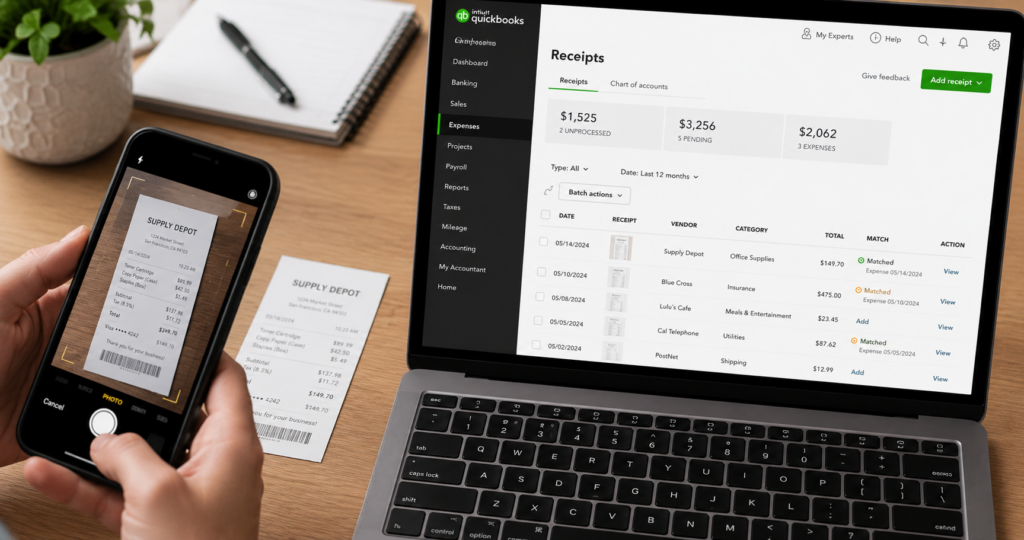
Yes. Photograph or upload a receipt, and QuickBooks’ AI reads the vendor, date, and amount, then matches it to the corresponding bank transaction already in your books.
That match happens without you digging through folders or email attachments looking for proof of a purchase months after the fact — the receipt image stays attached to the transaction permanently.
Can you ask QuickBooks questions in plain English?
Intuit Assist lets you type a plain-language question — how much did I spend on office supplies last month, who’s my most profitable client — and get an answer pulled directly from your data, without building a custom report first.
| Bookkeeping task | Manual approach | AI-assisted approach in QuickBooks |
|---|---|---|
| Categorizing transactions | Owner or bookkeeper tags each line by hand | Intuit Assist applies the category automatically once a pattern is confirmed |
| Catching duplicate payments | Found during a bank reconciliation, often weeks later | Flagged in real time as an unusual transaction |
| Matching receipts to expenses | Manually pairing paper receipts with entries | Receipt photographed, data extracted, and matched automatically |
| Forecasting cash flow | Built in a spreadsheet from historical averages | Generated from transaction history in the Cash Flow Planner |
What AI in QuickBooks means for your bookkeeping
The tasks AI now handles inside QuickBooks are the ones that used to eat the most hours: categorizing, matching, flagging, forecasting. That’s less time spent on data entry and correction, and more time available for the work that actually changes outcomes — budgeting, tax planning, and financial coaching.
AI-suggested categories and cash flow forecasts still need a second set of eyes. We review what QuickBooks’ AI is doing for our clients’ books every month, not just what it produces.
| Next step: Not sure which QuickBooks AI features are actually turned on for your business? Book a consultation with Blaize Accounting Services, and we’ll show you what to check. |
Frequently asked questions
Does QuickBooks’ AI replace the need for an accountant?
No. QuickBooks’ AI, including Intuit Assist, handles repetitive tasks like categorizing transactions and matching receipts, but it doesn’t interpret what the numbers mean for your tax strategy or catch every judgment call an experienced accountant would.
Is my financial data safe with QuickBooks’ AI features?
Intuit encrypts customer data in transit and at rest and states it does not sell customer financial data. As with any connected financial software, review your account permissions regularly and enable multi-factor authentication.
Which QuickBooks plan includes Intuit Assist?
Intuit is rolling out Intuit Assist features across QuickBooks Online plans in stages, so the exact tools available depend on your plan and region. Check the Intuit Assist tab in your QuickBooks account or ask your bookkeeper what’s currently active on your subscription.
How do I turn on AI transaction categorization in QuickBooks?
Categorization rules build automatically as you confirm or correct transactions in the Banking feed. You can also set up custom bank rules manually under Banking > Rules for vendors you want categorized a specific way every time.
Can QuickBooks’ AI make mistakes in my books?
Yes. AI-suggested categories and matches are based on patterns, not certainty, so they should be reviewed rather than accepted automatically. That’s one reason routine bookkeeper review still matters even with AI running in the background.
| Work with Blaize Accounting Services: Blaize Accounting Services helps small businesses and high-net-worth individuals across Bergen, Passaic, Essex, Morris, and Hudson counties set up QuickBooks so its AI tools save time instead of creating new things to review. Want to make sure your QuickBooks is set up to take full advantage of these AI features? Our QuickBooks and Xero setup and coaching service gets your account configured correctly and shows you how to use it. Schedule a call to see how it works for your books. |
ABOUT THE AUTHOR
Tania Blaize is the founder of Blaize Accounting Services, based in Bergen County, NJ, with more than 20 years of experience in bookkeeping, accounting, and tax planning. She works with small businesses and high-net-worth individuals across Northern NJ, including Passaic, Essex, Morris, and Hudson counties.
This article is general information, not tax or legal advice for your specific situation. Consult a qualified professional about how these tools apply to your own books.
