
filed in
QuickBooks Online Cleanup for Distributors: How to Fix Inventory, A/R, and Sales Tax

QuickBooks Online cleanup for a distributor means correcting inventory quantities and costs, matching receivables and payables to real invoices and bills, and reconciling every bank and credit card account, so your financial reports finally agree with your warehouse and your tax return. Inventory gets the most attention because it drives your cost of goods sold and your profit.
At Blaize Accounting Services, an accounting firm in Bergen County, New Jersey, we clean up QuickBooks Online files for distributors and wholesalers across Northern New Jersey. This guide walks through the order we follow, the reports that expose problems, and the mistakes that cost distributors the most at tax time.
What is QuickBooks Online cleanup for a distributor?
QuickBooks Online cleanup for a distributor is the process of correcting past transactions so that inventory, cost of goods sold, receivables, payables, and sales tax all agree with what actually happened.
| Definition: QuickBooks Online cleanup for distributors is the process of correcting inventory, receivables, payables, sales tax, and bank records so the financial statements match physical stock and real transactions. The goal is accurate cost of goods sold, reliable margins by product, and books that support a defensible tax return. |
A distributor’s books are harder to keep clean than a service firm’s books because every sale touches several accounts at once. One invoice moves revenue, receivables, inventory, cost of goods sold, and sales tax. When one link breaks, the errors spread to every report.
Signs your file needs cleanup
- Negative quantities on hand for items you know are sitting in the warehouse.
- An inventory asset balance on the balance sheet that does not match your physical count.
- Gross margin that swings wildly from month to month with no change in pricing.
- A large Undeposited Funds balance made up of old customer payments.
- Old open invoices and bills that customers and vendors say were paid long ago.
- Bank reconciliations that were skipped or forced to balance with adjusting entries.
- Sales tax collected that does not agree with the returns you filed with the state.
Why do distributor books get messy in QuickBooks Online?
Distributor books get messy because QuickBooks Online records inventory correctly only when transactions are entered in the right order, and warehouse activity rarely happens in that order.
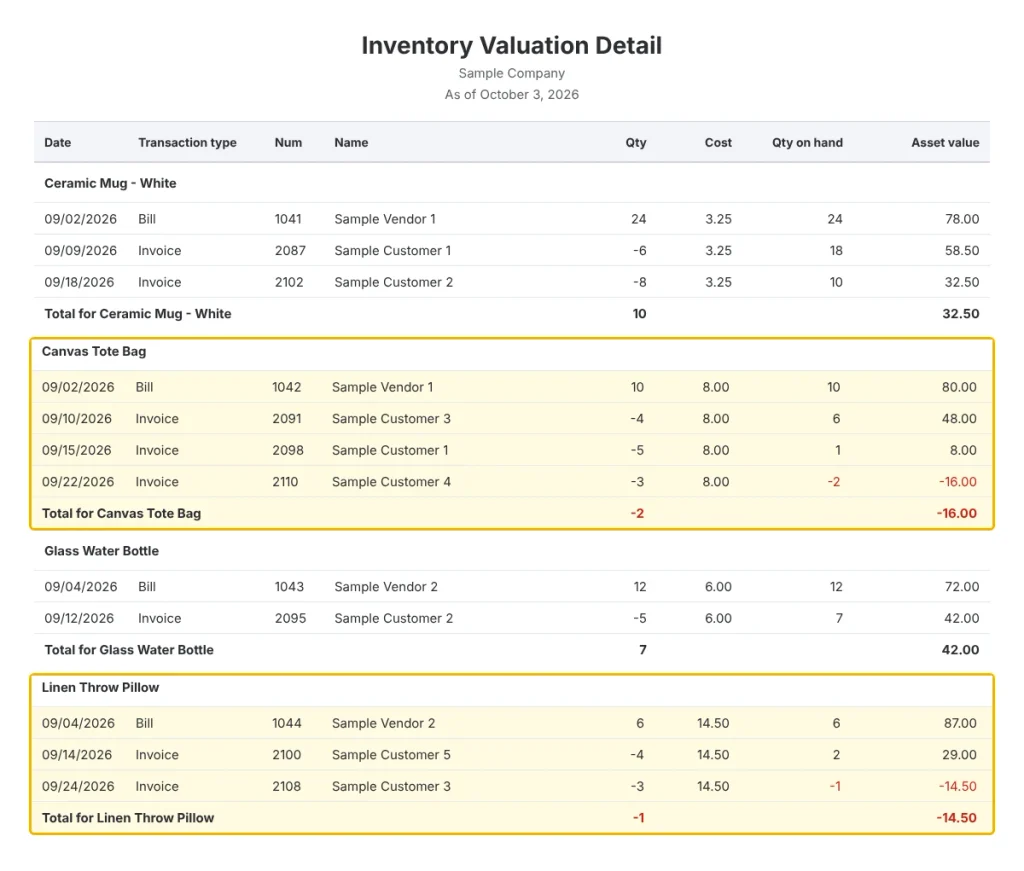
Intuit lists the common causes of negative inventory: selling more than the system shows on hand, purchase orders that were never entered, miscounted stock, vendor shipments that differ from the order, and purchase orders that were never converted to bills. Intuit also notes that QuickBooks counts items as inventory only after a bill is created.
Here is a composite example from our work. A wholesale distributor in Bergen County shipped product the same day it arrived, but the office entered vendor bills a week later. Every month the inventory report showed negative quantities, so the owner stopped trusting the margin numbers and started guessing at prices.
Most of the distributors we onboard share that pattern. The warehouse moves faster than the bookkeeping, and the gap shows up as errors that pile up for months before anyone notices.
What order should you follow when cleaning up QuickBooks Online?
Clean up in this order: bank and credit card accounts first, then receivables and payables, then inventory, then sales tax, and finally the profit and loss statement.
The order matters because each step depends on the one before it. You cannot trust an inventory adjustment if the bill that created the stock was posted to the wrong month, and you cannot trust a profit and loss statement until every account underneath it has been proven.
| Step | Area | What to check | QuickBooks report to run |
|---|---|---|---|
| 1 | Bank and credit cards | Every account reconciled to the statement, with no forced balances | Reconciliation Discrepancy Report |
| 2 | Receivables | Open invoices, unapplied payments, Undeposited Funds | A/R Aging Summary |
| 3 | Payables | Open bills compared to vendor statements | A/P Aging Summary |
| 4 | Inventory | Quantities, unit costs, and the asset balance | Inventory Valuation Detail and Summary |
| 5 | Sales tax | Exempt customers, certificates, tax collected | Sales Tax Liability Report |
| 6 | Profit and loss | Margins by month and by product | Profit and Loss by Month |
How do you start with bank and credit card reconciliations?
Start by reconciling each bank and credit card account back to the first month where the statement and QuickBooks stop agreeing.
Work forward one month at a time. Do not force a reconciliation to balance with a plug entry, because a plug hides the underlying error and moves it into a later month, where it is harder to find.
The Reconciliation Discrepancy Report in QuickBooks Online shows transactions that were changed, deleted, or added after a period was reconciled. Run it first, because edits to old transactions are one of the most common reasons an account that once balanced no longer does.
How do you fix accounts receivable, accounts payable, and Undeposited Funds?
Fix receivables and payables by matching every open item to a real invoice, bill, and payment, then clearing anything that does not match.
- Undeposited Funds. Group every customer payment into a bank deposit that matches the bank statement. An old balance usually means payments were recorded twice or deposits were never linked.
- Unapplied payments and credits. Apply customer payments and credit memos to the invoices they belong to, so the aging report shows what customers truly owe.
- Open bills. Compare the A/P Aging Summary to each vendor statement. Differences point to missing bills, duplicate bills, or payments entered to the wrong vendor.
- Freight and landed costs. Decide how freight in, duties, and handling are recorded, and apply that choice consistently, because these costs belong in the cost of what you sell.
Finish this step before you touch inventory. Unmatched payments and deposits distort revenue, and revenue errors make it harder to see whether an inventory problem is real or just a timing issue.
How do you clean up inventory in QuickBooks Online?
Clean up inventory in QuickBooks Online by proving quantities first, then values, then dates.
- Run the Inventory Valuation Detail report and look for items with a negative quantity on hand. Intuit recommends this report as the first step in fixing negative inventory.
- Convert open purchase orders to bills for shipments that already arrived, so QuickBooks recognizes the stock on the correct receipt date.
- Count the warehouse and compare the count to the Inventory Valuation Summary, item by item.
- Post inventory quantity adjustments for confirmed differences, and record the offset to an inventory adjustment or shrinkage account, never to sales.
- Review unit costs on items where the cost looks impossible, such as a cost that is higher than the selling price.
- Merge or inactivate duplicate items that were created when a part number or supplier changed.
- Tie the Inventory Asset account on the balance sheet to the Inventory Valuation Summary as of the same date.
Choose the costing method carefully
QuickBooks Online offers two inventory costing methods: first-in, first-out (FIFO) and moving average cost. Intuit states that QuickBooks defaults to FIFO if you create an inventory item before choosing a method, and that the method can’t be changed later.
Confirm which method your file uses before you adjust any costs, and confirm the choice with your tax preparer. A costing method that does not fit how you buy and sell can distort margins on every product line.
What should distributors check on sales tax and resale certificates in New Jersey?
Check that every wholesale customer who buys tax-free has a completed New Jersey resale certificate on file, and that the customer’s tax settings in QuickBooks match that certificate.
The New Jersey Division of Taxation publishes Form ST-3, the Sales Tax Resale Certificate, which lets a registered business buy goods for resale without paying sales tax. According to the form, a seller must receive it within 90 days of the sale to be relieved of the duty to collect the tax, and must keep it for four years from the date of the last sale it covers. For a blanket certificate covering repeat purchases, the form calls for no more than 12 months between transactions.
- Mark tax-exempt customers in QuickBooks and attach the certificate to the customer record, so it is easy to find in an audit.
- Run a sales by customer report for tax-exempt customers and confirm a certificate exists for each one.
- Compare sales tax collected in QuickBooks to the amounts on your filed returns each period, and investigate every difference.
A missing certificate is a real exposure, because the state can look to the seller for tax that should have been collected. Fixing the paperwork during cleanup is far cheaper than fixing it during an audit.
Which cleanup errors do the most damage at tax time?
The errors that hurt most at tax time are the ones that misstate cost of goods sold, because they change your taxable profit directly.
| Cleanup error | What it does to the return | The fix |
|---|---|---|
| Inventory balance not tied to a count | Overstates or understates cost of goods sold and profit | Reconcile a year-end count to the Inventory Asset account |
| Freight and purchase costs coded inconsistently | Distorts gross margin and makes product pricing unreliable | Set one written policy for landed costs |
| Old Undeposited Funds balance | Leaves revenue and cash out of sync | Match every payment to a bank deposit |
| Missing vendor tax information | Creates late or missed information returns | Collect a W-9 before the first payment |
Inventory rules also depend on the size of your business. According to Thomas Howell Ferguson, businesses with average annual gross receipts of $32 million or less over the prior three years may qualify for simplified inventory accounting. Whether that applies to you depends on your facts, so confirm it with a tax professional before changing any method.
Review your contractor list too. The IRS says the Form 1099-NEC reporting threshold rose from $600 to $2,000 for payments made after December 31, 2025, which changes who you need to report for freight carriers, installers, and other nonemployees.
How long does a distributor cleanup take, and when should you hire help?
Cleanup time depends on how many months are affected, how many inventory items you carry, and how reliable your records are, so scope the work before you start.
- Number of months with unreconciled or questionable activity.
- Item count, including duplicates and discontinued products.
- Number of accounts, such as bank accounts, credit cards, and loans.
- Whether a recent physical count exists to prove quantities.
- Complexity such as returns, multiple locations, or special pricing.
Hire help when the file has more than a year of unreconciled activity, when inventory values cannot be tied to a count, or when a tax return, a loan application, or the sale of the business depends on the numbers. Blaize Accounting Services scopes each cleanup engagement individually after reviewing the file, so the work fits the problem instead of a generic package.
If you also need ongoing support after cleanup, our bookkeeping for distributors in New Jersey service keeps the file clean month after month. Cleanup that is not followed by a monthly routine tends to drift back to the same problems within a year.
How do you keep QuickBooks Online clean after the cleanup?
Keep the file clean with a short monthly close that catches problems while they are still small.
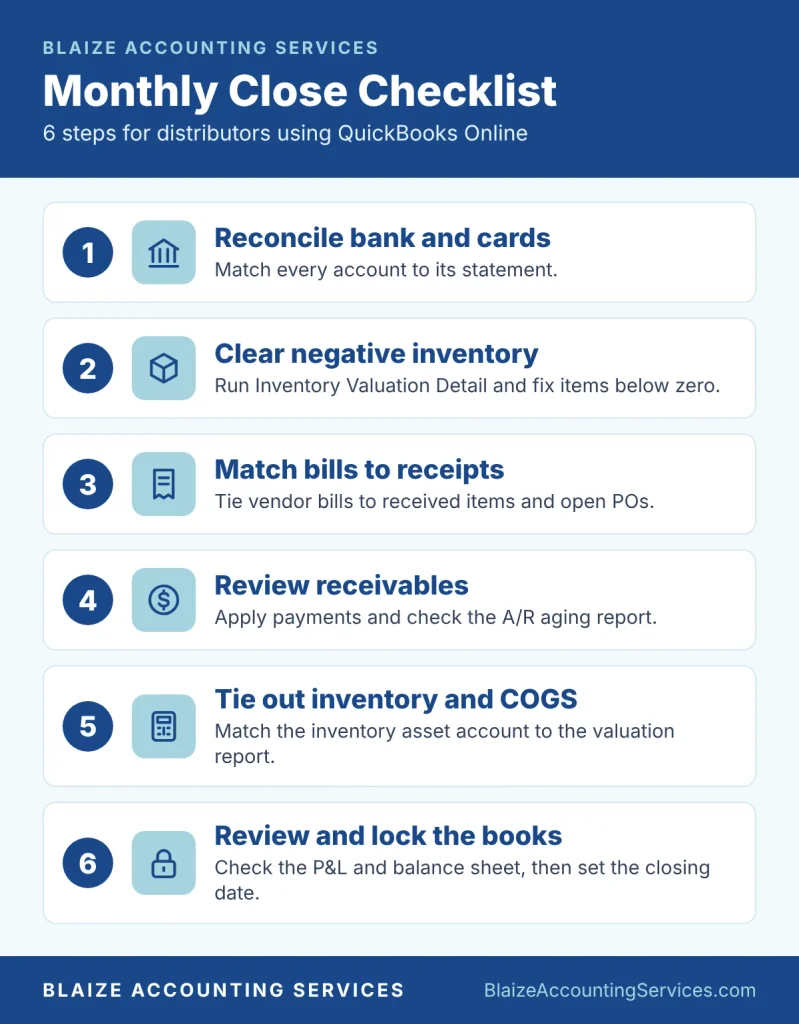
- Reconcile every bank and credit card account within days of the statement.
- Review the Inventory Valuation Detail report for negative quantities.
- Convert received purchase orders to bills the day the stock arrives.
- Clear Undeposited Funds by matching payments to bank deposits.
- Compare the A/R and A/P aging reports to customer and vendor statements.
- Compare sales tax collected to the return you filed, and file the exemption certificates for new wholesale customers.
| Free checklist: Not sure whether your books are ready for your tax preparer? Download our Are Your Books Tax Ready checklist and walk your file through it before your next deadline. |
If your monthly close keeps slipping, that is useful information. It usually means the process needs a professional owner, and it is often a sign that tax planning decisions are being made on unreliable numbers.
| Next step: Seeing negative inventory or a margin you do not trust? Book a QuickBooks Online cleanup consultation, and we will review your file and tell you exactly what needs fixing. |
Frequently asked questions
How much does QuickBooks Online cleanup cost for a distributor?
The cost depends on the number of months affected, the number of inventory items, and the condition of your records. Blaize Accounting Services scopes each cleanup individually after reviewing your file, so the fee reflects the actual work involved.
Can QuickBooks Online handle inventory for a wholesale distributor?
Yes, for many distributors. Intuit lists inventory tracking in several QuickBooks Online plans, with FIFO and moving average cost methods. Distributors with multiple warehouses, lot tracking, or complex pricing should have their needs reviewed, because they may need additional tools.
Why does QuickBooks Online show negative inventory?
Negative inventory usually happens when you sell items before QuickBooks shows them on hand. Common causes include unentered purchase orders, purchase orders never converted to bills, miscounts, and vendor shipments that differ from the order.
Can I change my inventory costing method in QuickBooks Online?
Intuit states that the costing method can’t be changed later, so choose carefully before you create inventory items. Talk to your tax preparer first, because the method affects cost of goods sold.
Do I need a resale certificate from every wholesale customer in New Jersey?
If you sell tax-free for resale, you need a completed resale certificate such as Form ST-3 from the buyer. The form says the seller must receive it within 90 days of the sale and keep it for four years from the last sale it covers.
What is the 1099-NEC threshold for 2026?
The IRS says the reporting threshold is $2,000 for payments made after December 31, 2025. It was $600 before that date.
How often should a distributor reconcile QuickBooks Online?
Reconcile every bank and credit card account monthly, and review inventory reports at the same time. Count physical inventory at least once a year, and more often if your stock moves quickly.
| Work with Blaize Accounting Services: Blaize Accounting Services helps distributors and wholesalers across Bergen, Passaic, Essex, Morris, and Hudson counties get clean, reliable books in QuickBooks Online. Schedule a consultation, and we will scope your cleanup before any work begins. |
ABOUT THE AUTHOR
Tania Blaize is the founder and principal accountant of Blaize Accounting Services, a Bergenfield, New Jersey firm serving small businesses and high-net-worth individuals across Bergen, Passaic, Essex, Morris, and Hudson counties. With more than 20 years of experience, including senior management roles at advisory firms, she specializes in QuickBooks Online cleanup, bookkeeping, and tax planning for distributors and wholesalers. She is an Enrolled Agent, QuickBooks ProAdvisor, and holds an MBA in Finance.
This article is general information, not tax or legal advice for a specific situation. Consult a qualified professional about your own facts.
